High School & Dual Credit — one workspace

Homeschool-to-college strategy.
The guidance layer above your gradebook.

prevvu is for the guidance-counselor work — college-ready transcripts, dual credit strategy, degree planning — plus the course tracking and GPA math you still need. Built for independent homeschool families from ninth grade through dual credit and early college.

Built for homeschool families  ·  Simple annual pricing
prevvu.io/app
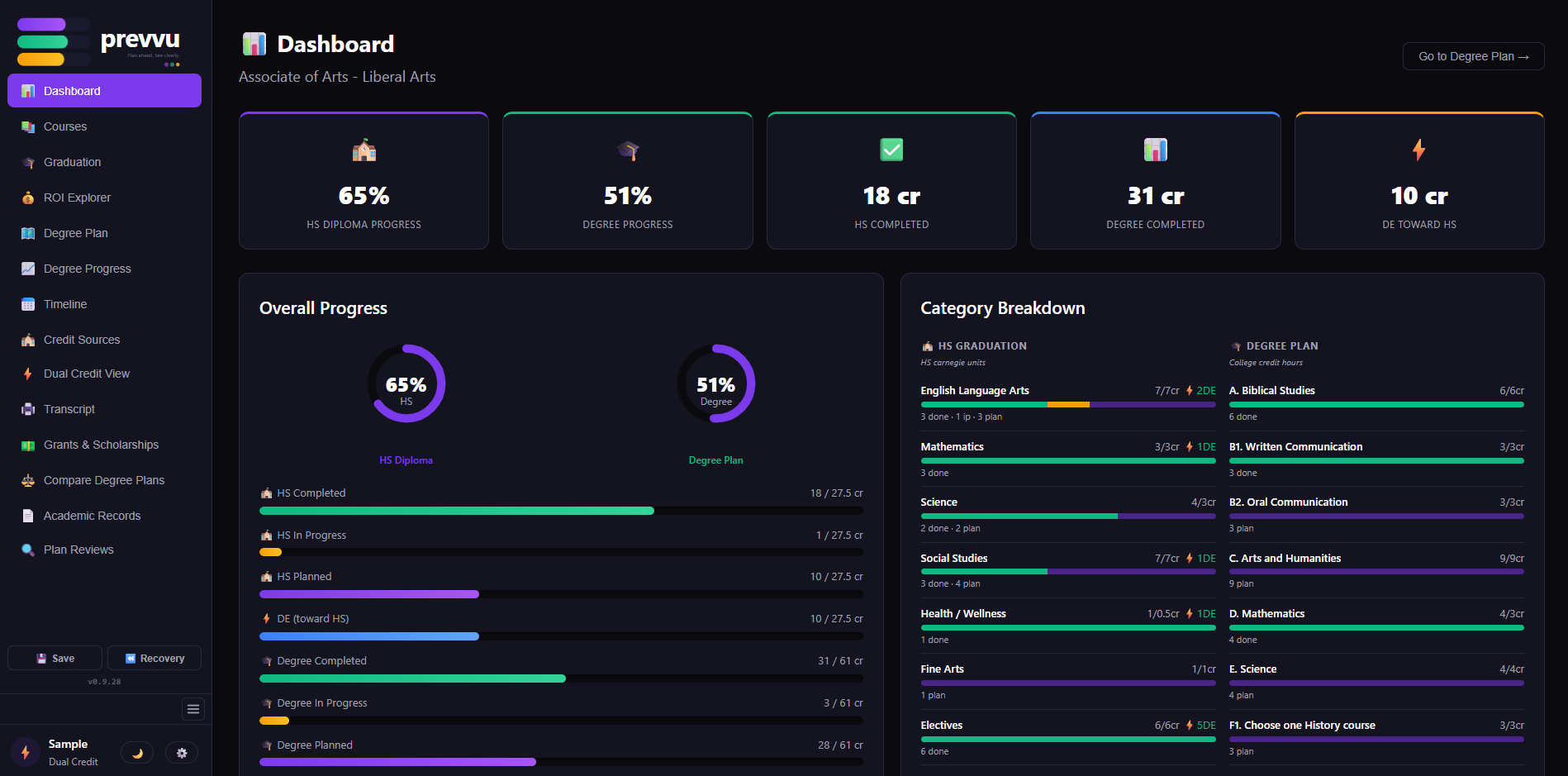
prevvu dashboard — overall progress with done / in-progress / planned bars, dual-track HS + degree, category breakdown
📚 Track high school through dual credit in one place
🎓 Generate college-ready transcripts in minutes
💰 See exactly what your DE credits are worth at your target school
Dual enrollment planning — credit overlap, degree tracking, cost comparison

The role you didn't know you'd need to fill.

When you started homeschooling, you replaced the classroom. That part you saw coming — you've been the teacher. What sneaks up, usually somewhere between 8th and 10th grade, is the other role traditional students get for free.

✓ The role you planned for
👩‍🏫 The teacher
  • Picking curriculum
  • Lesson plans & daily instruction
  • Grading assignments
  • Keeping a gradebook
  • Knowing your student inside and out

Handled — by you, and the tools you've already chosen for the job.

! The role that sneaks up
🎓 The school guidance counselor
  • Tracking graduation requirements
  • Coordinating dual enrollment
  • Writing transcripts colleges will accept
  • Mapping which credits transfer to which degree
  • Steering the timeline toward "ready for what's next"

Traditional schools have a program, a process, a strategy for this. Homeschool families have been left to assemble it from blog posts and spreadsheets — while still teaching algebra and grading assignments.

That's the gap we built prevvu to fill.

Not another gradebook. The other half.

Homeschool-to-college strategy is due for an upgrade.

prevvu isn't a gradebook or a lesson planner — those tools exist, and they do their job. This is the layer above: academic records, dual credit strategy, degree planning, and college-ready transcripts. The work a school guidance counselor would handle for a traditional student — purpose-built for the families doing it themselves.

Spreadsheets, Word docs, and binder tabs have carried homeschool families a long way, and the work parents have already put in is real. But the stakes climb every year, and the patchwork wasn't built for transcripts, dual credit transfer, and degree-plan math. Time for tooling that was.

🧰 The patchwork approach
  • 📊 Course-tracking in spreadsheets — works until one stray cell or formula tweak shifts a GPA on a transcript that's already gone out
  • 📚 Dual credit transfer rules live across dozens of college catalogs — figuring out which credits actually apply means hours of catalog reading per institution
  • 💸 Tuition-savings math from DE credits is hard to see in advance — by the time it's clear what counted, the courses are already chosen
  • 📄 Word-document transcripts have to be hand-rebuilt every time a college, scholarship app, or recruiter asks for one
  • 📅 Graduation-requirement tracking across 6+ years of coursework is a lot to hold in one head — and the cost of a missed requirement shows up senior year
✨ With prevvu
  • 📊 GPA calculated automatically — weighted, unweighted, whatever colleges need
  • 🗺️ Every credit, every source, every semester — organized in a single view
  • Credit overlap detection shows which dual credit courses apply to which degree — and which don't
  • 📄 Generate a professional, college-accepted transcript in one click — no formatting required
  • 🔮 A complete picture of every course, every credit, and exactly how much your student has saved on tuition

Up and running in minutes.

Whether your student is starting ninth grade or stacking dual credit, prevvu meets you where you are.

1 Choose your path

Start where your student is — not where someone else thinks they should be.

High School or Dual Credit — pick the subscription that matches how your student is earning credit. prevvu unlocks the right tools for that path and stays out of the way for the parts you've already got handled.

prevvu.io/app
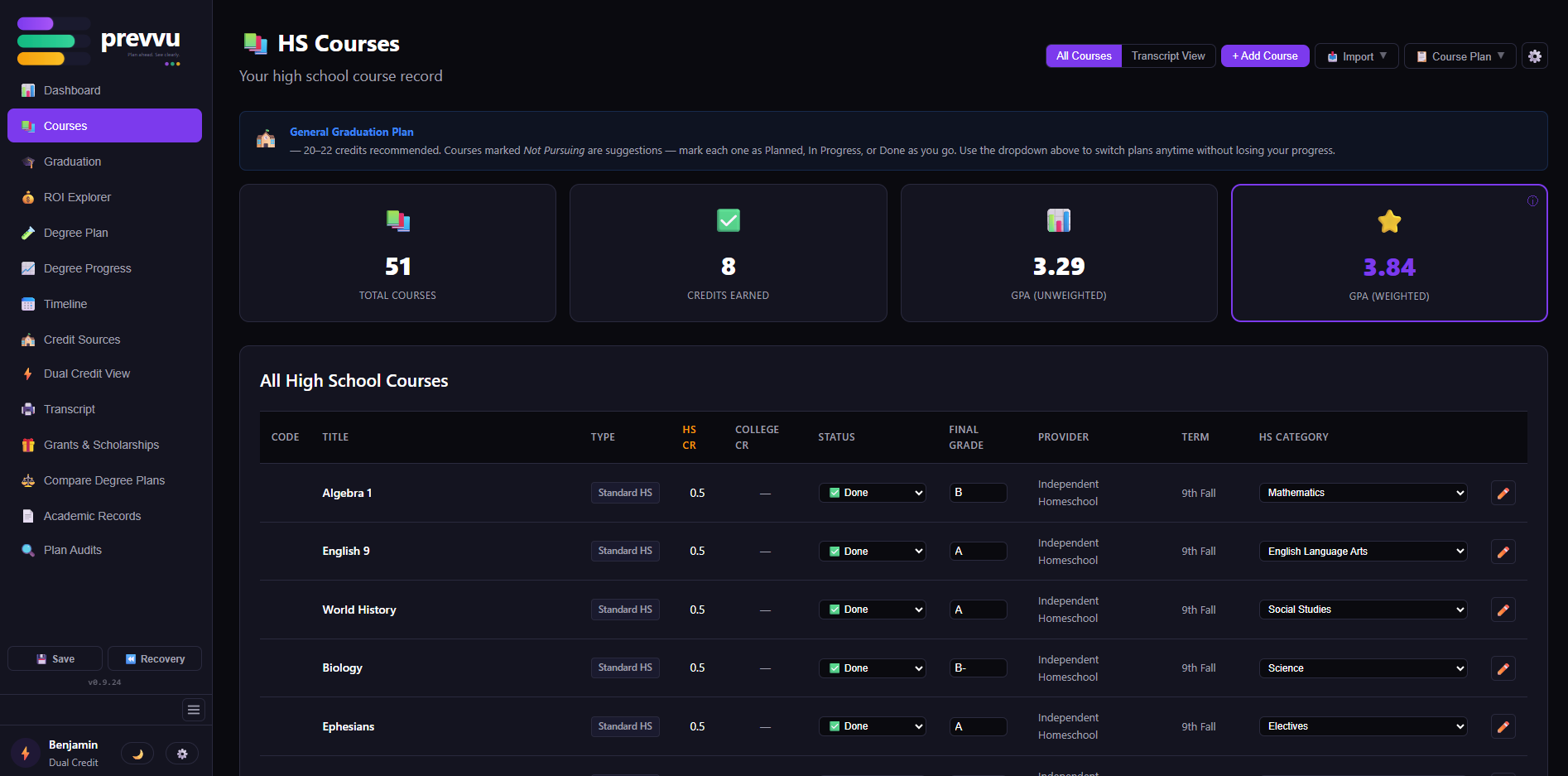
prevvu HS courses view — courses listed by year with status, credits, and grades
2 Build the record

Every course, every credit, every source — in one organized place.

Add completed and planned courses, import transcripts you already have, and connect credits from any source — community college, CLEP, AP, dual credit. We do the GPA math, credit math, and graduation-requirement tracking automatically.

prevvu.io/app
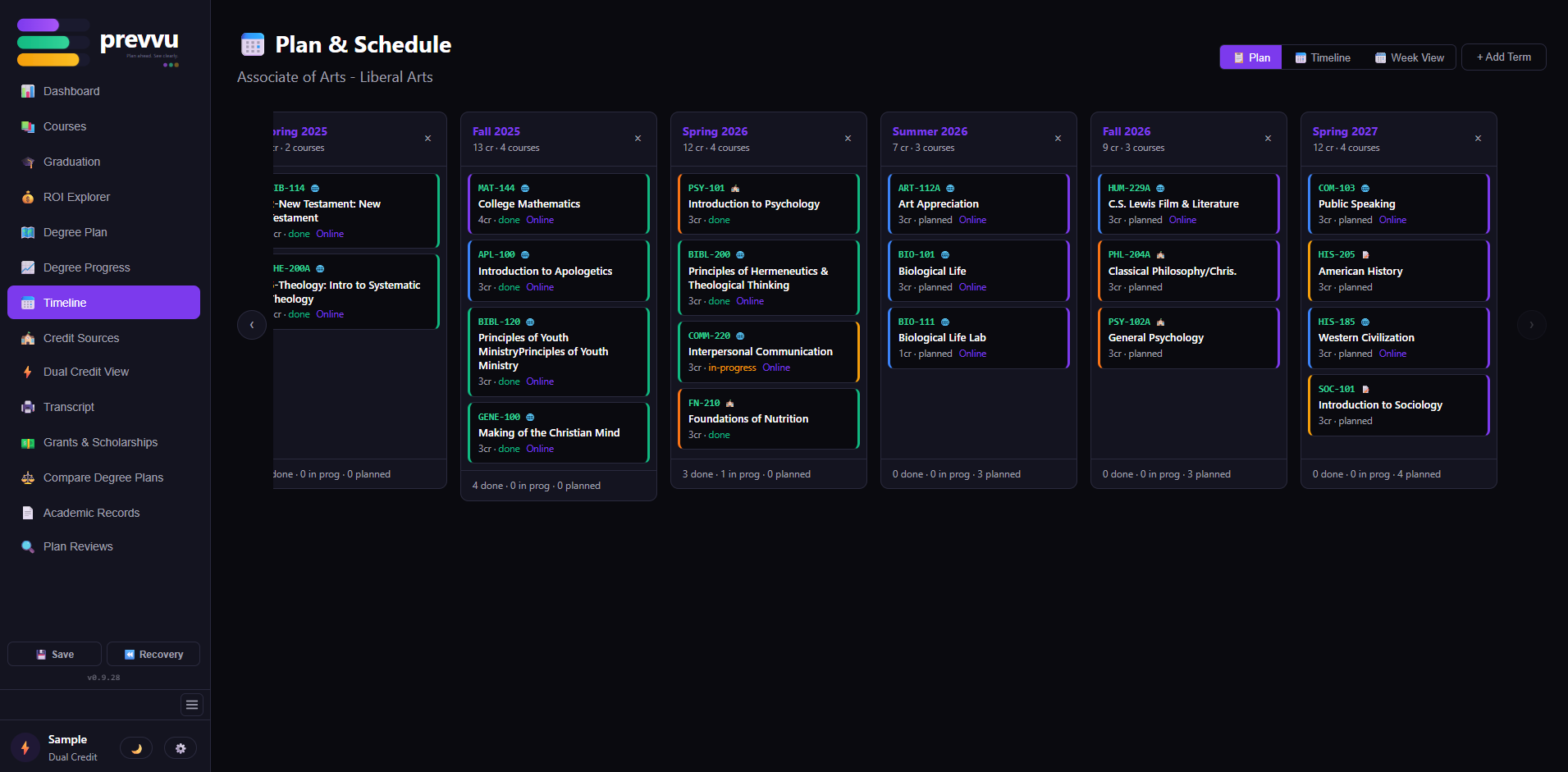
prevvu Plan & Schedule view — six semesters side-by-side with courses placed in each term, color-coded by status
3 See the whole picture

Graduation progress, dual credit value, college-ready transcripts — at a glance.

Watch your student's HS graduation progress and degree progress side-by-side. See exactly which dual credit courses transfer where, and what they're worth in tuition saved. Export a college-accepted transcript in one click — no formatting required.

prevvu.io/app
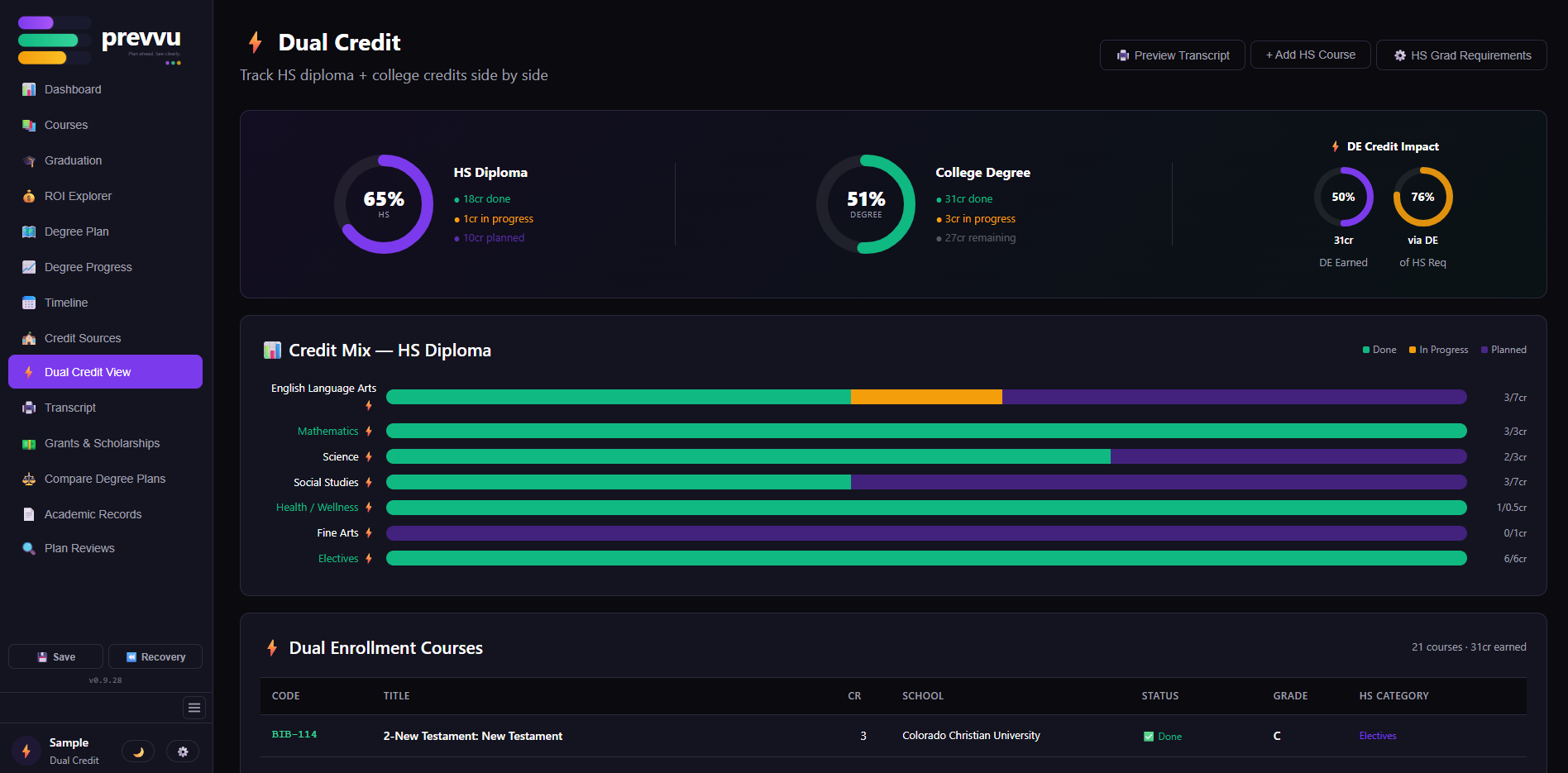
prevvu Dual Credit View — HS Diploma 65% / College Degree 51% with DC Credit Impact stat trio and Credit Mix segmented bars

Everything your family needs — nothing you don't.

prevvu is purpose-built end-to-end for the homeschool → dual credit → college journey.

📄 Transcript Generation

The transcript that gets students in.

Generate professional homeschool transcripts colleges accept — formatted correctly, every time. A proven format that has already helped students get accepted at multiple accredited 4-year universities. Export and upload directly to any admissions portal.

Unweighted GPA automatically. Upgrade to Dual Credit for weighted GPA across AP, IB, CLEP, and DE. Choose weighted, unweighted, or both — to match exactly what each college wants to see.

Unlimited exports · included with your plan
prevvu.io/app
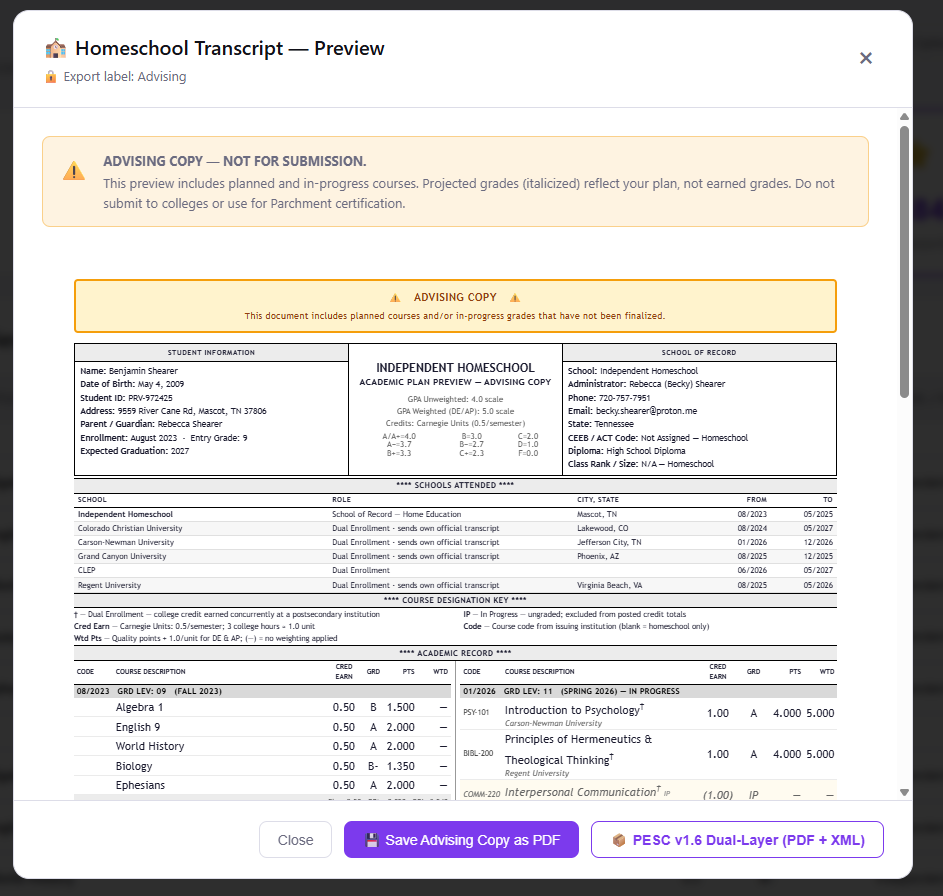
prevvu Official Transcript — college-ready format with weighted/unweighted GPA, course list by year, credit totals
Dual Credit Strategy

Every credit, mapped to where it actually counts.

Plan college credits earned during high school — through Dual Enrollment, Early College, AP, IB, or CLEP. Map your courses against your target degree's requirements and see exactly where credits should land.

No tool can instantly confirm whether they will — most registrars don't publish that data publicly, by design. If they do, we'll find it. If they don't, our Plan Review gets you the answer in writing.

prevvu.io/app
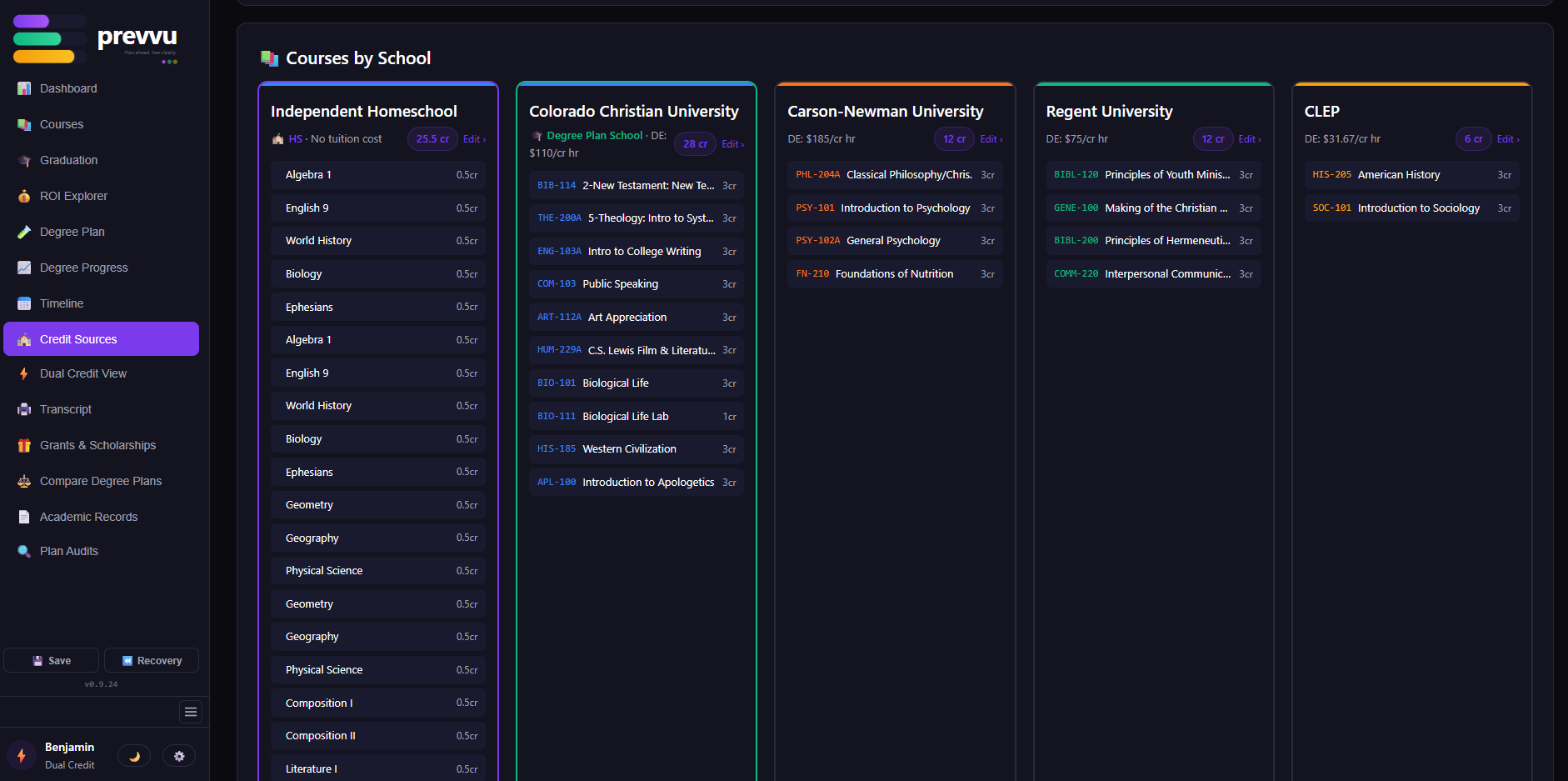
prevvu Credit Sources view — every credit organized by institution with credit-type classification
📈 Dual-Track Progress

High school graduation and college degree progress — side by side.

Watch your student's HS graduation plan and their degree plan progress simultaneously. Course-tracking from 6th grade through college, organized by year, subject, and credit source — never lose a grade or a credit again.

Spot gaps before they become senior-year emergencies. See which dual credit courses do double duty for HS requirements and which only count toward the degree. The kind of view a school guidance counselor would have on day one — just for your student.

prevvu.io/app
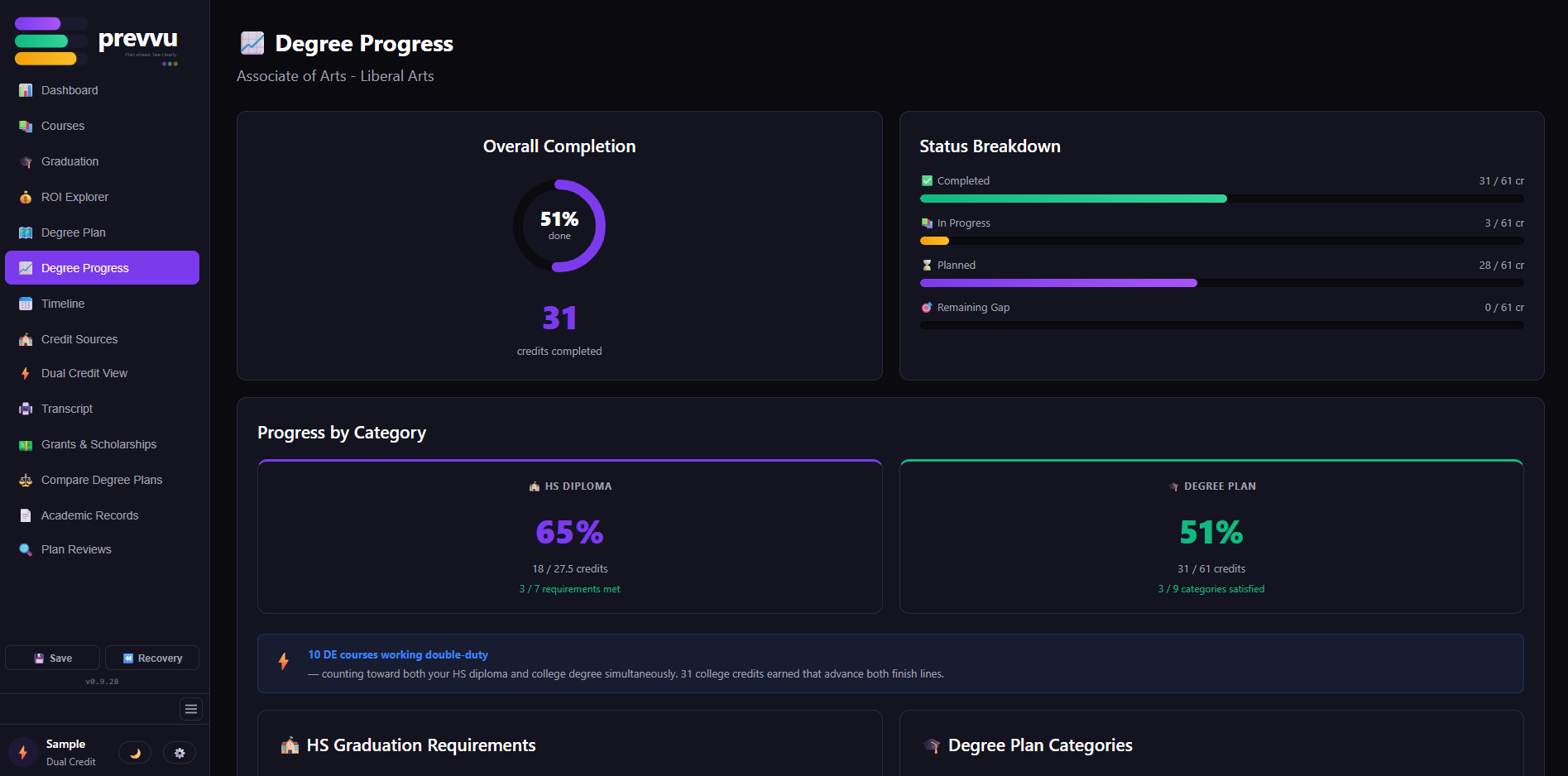
prevvu Degree Progress — Overall Completion donut, Status Breakdown bars, HS Diploma + Degree Plan side-by-side comparison
💰 ROI Calculator

See exactly what your dual credit work is worth.

Compare tuition costs across credit sources — community college, AP, CLEP, dual enrollment — and watch your savings add up in real time. Know what each course is buying you before you commit to it.

The ROI on years of hard work, in writing. Proof for everyone (including your student) that the path you chose paid off.

prevvu.io/app
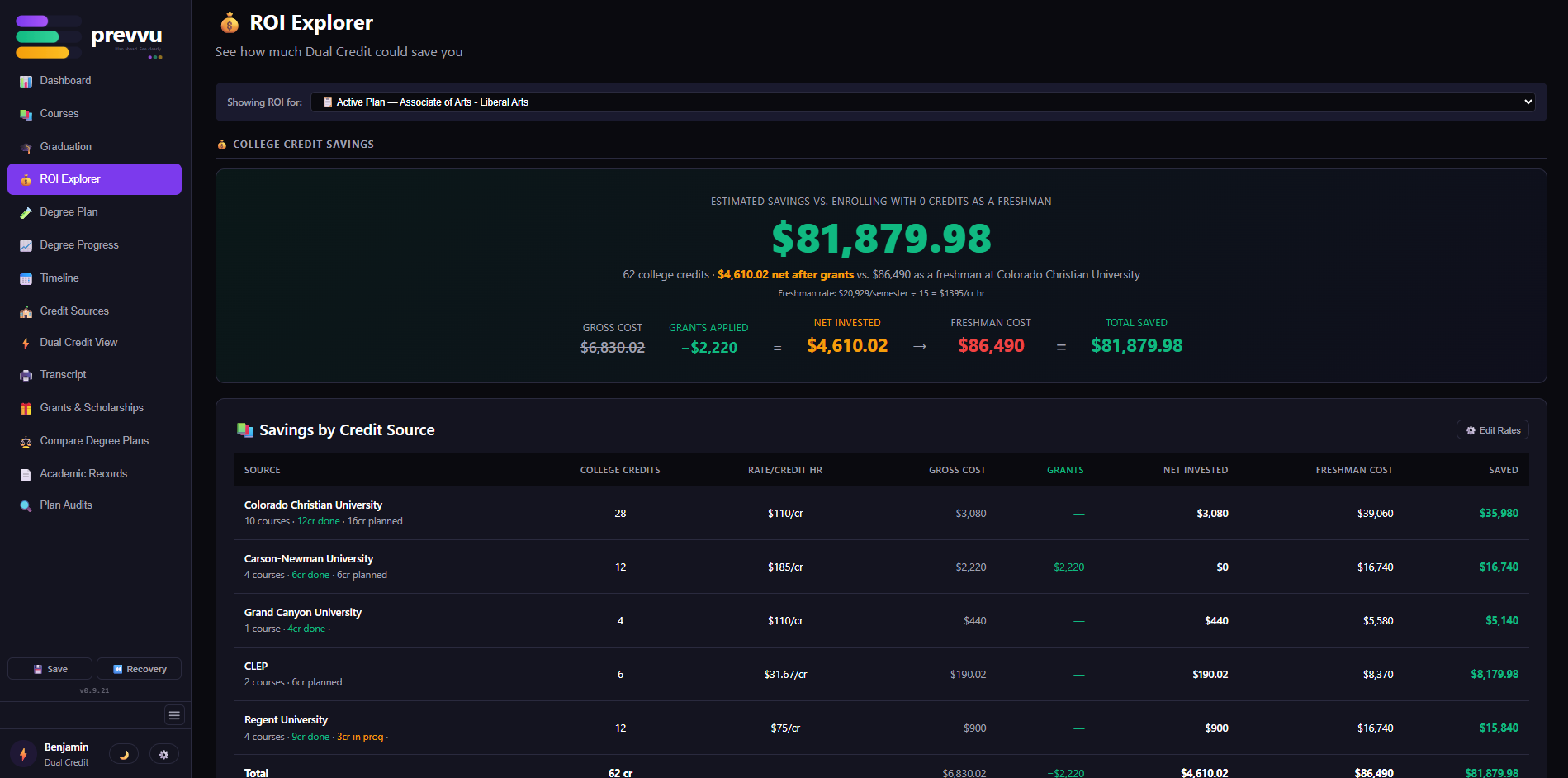
prevvu ROI Calculator — tuition savings comparison across credit sources
🔐
Optional · High School + · All paid plans

Official Academic Record — your records, on your terms.

For families who want institutional-grade record integrity: lock any completed semester as "official," creating a tamper-proof, date-stamped entry in your student's Audit Log. Each semester locks independently. Colleges, scholarships, and employers can verify the chain of custody back to 9th grade using a student-controlled 6-character access code. FERPA-compliant. No umbrella school required.

For families who don't want it: it's invisible. Your records stay exactly as flexible as you need them to be.

Start where you are. Upgrade when you're ready.

Simple, transparent pricing. No subscriptions designed to trap you — just the plan that fits your family's stage.

🌞 Summer Launch Promo

Free Jump Start expert setup with any Dual Credit Annual subscription.

We personally load and validate your student's data so your account is ready to use from day one — no guesswork on the import, no second-guessing what's in there. $25 value, free — code applied automatically at checkout.

Promo code auto-applied: SUMRJMP26
Subscribe → DC $95/yr
Applied automatically — no code needed
🏫

High School

Grades 9–12 · Build the official transcript

$45 / year
No semester. No monthly. Just clean.
  • Course tracking, grades, & semester organization
  • GPA calculation (unweighted — standard 4.0)
  • HS graduation requirement tracking
  • Unlimited transcript exports — formatted and ready to send to any college or university
  • Transcript export history — always know exactly what each school received
  • Custom homeschool branding — logo, administrator signature, school identity
  • Parchment-grade PDF with embedded PESC v1.5 transcript XML — accepted by colleges
Get Started · One-time services

Quick services to get unstuck — $25 each.

Two accessible add-ons designed to remove the most common blockers: the "where do I even start?" hurdle (Jump Start) and the Common App essay weekend-of-drudge (Common App Drafts). Less than the cost of a month of your streaming bundle — but this one actually helps your kid get into college.

Jump Start Session
Skip the "where do I even start?" hurdle. We load your data + set up your degree plan (1 Business Day delivery SLA).
$25
one-time
Add — $25 →
Common App Essay Drafts
3 versions of each (School Profile and Counselor Recommendation) AI-drafted personal statements grounded in transcript/academic record.
$35
one-time
Add — $35 →
from
$25
Jump Start · Common App Drafts
← Pick the service you want from the cards on the left to go straight to checkout.
Plan Reviews · expert services à la carte

Catch the gaps before they cost you.

Real expert review of your student's plan — checked line-by-line against state graduation requirements, your target colleges' admission profiles, and (for dual-credit families) the receiving school's transfer policies. Written report in 5 business days, with direct line to your reviewer for follow-up questions.

Most Popular
⚡ Dual Credit Plan Review
$250
one-time
The transfer credit defense plan.
  • Target-school transfer policy research — PLC caps, equivalency lists, the fine print most families never see
  • Course descriptions documented from each credit-issuing institution your student has earned credits from
  • Pre-commitment evaluation, in writing — where each credit is likely to land at your top-choice schools
  • Includes everything in the MS/HS Plan Review
5 business days · written report · direct line to your reviewer
Read full details →
📚 MS/HS Plan Review
$95
one-time
Validate the High School Graduation Plan.
  • State homeschool graduation requirements check — line-by-line
  • Target-school admission profile alignment (when target schools are named)
  • Custom HS path engineered to meet or exceed each target school's admission profile
  • Best started 8th–10th grade · Still high-value through senior year for application prep
5 business days · written report · direct line to your reviewer
Read full details →
See all Plan Reviews + FAQ →

Secure payment · Annual & semester plans only

Questions homeschool families ask us most.

Everything from "how do credits work" to "will my student's credits actually transfer."

Getting Started
Do I need an umbrella school to use prevvu?

No. prevvu is built specifically for fully independent homeschoolers — you're the school authority. prevvu gives you the professional tools to document and present your student's record the same way an accredited school would, without needing an outside institution to back it.

What grade levels does prevvu support?

prevvu covers elementary through high school graduation, plus dual credit and early college students. Elementary and middle school records are tracked separately from the formal high school transcript, so your 9th-grade GPA starts clean.

Is there a free trial?

prevvu is built for High School and Dual Credit subscriptions at launch. High School is $45/year; Dual Credit is $95/year (software access). You can start with either plan and upgrade later — you only pay the prorated difference. A live demo environment is on the roadmap.

When should I check, manage, or adjust my student's course plan?

More frequently than you might think! A course plan isn't a "set it and forget it" document — it's a living record. Here are the four moments across each school year that really matter:

July – August

Finalize last year's records and submit them to your county or oversight entity — that paperwork doesn't file itself. Then jump on registration for the new year, fast: grab those Dual Enrollment seats before the gen-ed sections fill up. (They will. Earlier than you think.)

November – January

Mid-year is when reality hits the plan. Didn't get off a waitlist? Course got cancelled? Instructor change? Schedule conflict pop up? Time to roll with the punches and shuffle things around. Just make sure when you move a course to a different term, the course is really offered then — pushing it to a term where it isn't offered means moving it again. (Ask us how we know.)

March – May

Get the transcript into recruiter-ready condition. Campus visit season is starting — and just like you wouldn't show up to a job interview without a copy of your resume, you shouldn't show up to a campus visit without a copy of your student's transcript. Hand admissions something polished, on the spot. The conversation goes differently when you do — you'll be surprised how fast hypotheticals turn into "wait right here while I run this past the registrar." We've seen a single campus visit turn into a $50,000 scholarship offer because the transcript was ready at the table.

April – June

Stress-test the timeline. If your student gets waitlisted for a key course this fall, do they still graduate on time? If the answer is "maybe not," this is when you plan a CLEP test or a summer session — bake some resilience in now, harden the plan against unforeseen speedbumps before they show up. Better to have a contingency you don't end up needing than to scramble in October.

prevvu is built around this rhythm — your record stays current between adjustments, transcripts regenerate in seconds when a campus visit pops up, and the Academic Records lock turns each year's snapshot into a verifiable, immutable record schools can trust.

Transcripts & Credits
Do homeschool transcripts need to be notarized?

No. A prevvu transcript is a professionally formatted, parent-issued academic document — exactly what colleges expect from independent homeschools. You export it as a PDF and submit it directly through the college's portal, Common App, or by mail. No notarization required.

How do I send transcripts electronically to colleges?

Export your finalized transcript as a PDF and upload it directly to any college admissions portal or email it to admissions — most colleges accept PDF transcripts from independent homeschools. For Common App schools, prevvu's Common App Package prepares your School Profile and Counselor Letter drafts so everything is ready to attach in one submission.

Does prevvu integrate with Parchment?

Status as of May 2026: we're actively exploring Parchment network membership — stay tuned! In the meantime, prevvu exports a Parchment-grade PDF with embedded PESC v1.5 transcript XML that colleges, registrars, and admissions portals accept directly.

How are high school credits calculated?

Most states use the Carnegie unit system: one full-year course = 1 credit; one semester course = ½ credit, assuming ~120 hours of coursework. prevvu uses Carnegie units by default. If your state or recipient institution uses a different scale, you can adjust credit values per course manually. When in doubt, Carnegie units are universally understood and the safest default.

How many credits should my student complete over four years?

It depends on the path. General plans typically land between 20–22 credits; college prep runs 24–28; rigorous college prep can reach 26–30. prevvu tracks progress toward your target automatically.

How should I list dual enrollment or college courses on the transcript?

prevvu handles this automatically — dual credit courses are tagged with their source institution and display correctly on the transcript. The standard approach is to add an asterisk next to the course title and identify the college in the notes section. prevvu does this for you.

Can I include high school-level courses taken before 9th grade?

Yes. Courses like Algebra I or a foreign language completed in middle school can appear on the high school transcript. Add them to your 9th grade year in prevvu and note in the course description that they were completed prior to 9th grade. Keep supporting documentation — a grade report or dated curriculum records — in case a college requests verification.

Should I include courses my student took at a public or private school?

Yes — include all high school coursework in one place. For courses from an accredited school, note the institution and its accrediting body in the transcript comments. Plan to submit both transcripts together during college applications.

How do I calculate a weighted GPA for Honors or AP courses?

Honors courses add 0.5 points; AP courses add 1 point to the standard GPA. prevvu calculates both weighted and unweighted GPA automatically once you label the course. Note: officially designating a course as "AP" requires the syllabus to be reviewed by the College Board's AP Central Department.

What grading scale should I use?

The choice is yours — the standard A–F scale is most common. Whatever you choose, set it consistently and prevvu applies it across all GPA calculations. prevvu automatically displays both weighted and unweighted GPA on your transcript when your plan includes weighted courses (Honors, AP, DE, IB, CLEP). If no weighted courses are present, only the unweighted GPA is shown.

Official Academic Record
What is the Official Academic Record?

Completely optional — prevvu works exactly the same whether you ever touch this feature or not. It's there for families who want a verifiable chain of custody on their student's record.

When you choose to lock a semester as "official," prevvu creates a tamper-proof, date-stamped snapshot. Any college, scholarship committee, or employer can verify that record using a student-controlled 6-character access code — no umbrella school required. Each semester locks independently, so one locked semester doesn't affect any other.

If you prefer to keep full flexibility over your student's records — which is entirely your right as the school authority — simply don't use it. Nothing else changes.

What if I need to correct something after locking a semester?

You can unlock any semester, make the correction, and re-lock. The audit trail records the unlock — so verifiers see the full history, including when changes were made. Re-locking resets the chain of custody date for that semester, which is visible to anyone viewing the record.

Do transcripts need to be kept as permanent records?

Yes — transcripts can be requested years or even decades after graduation, for graduate school, employment, professional licensing, military service, and more. Whether you use the Official Academic Record feature or not, we recommend keeping a printed backup and exporting an electronic copy of your student's data periodically.

Credit Transfer & Plan Reviews
Will my student's dual credit courses transfer to their university?

No tool can instantly tell you — most registrars don't publish transfer acceptance data publicly, by design. prevvu's gap analysis shows where your credits should land based on course codes. For a documented answer, our Plan Review has a real person contact the registrar on your behalf and deliver the result in writing — so you know before your student enrolls, not after.

What exactly is a Plan Review?

Our team contacts your target institution's registrar professionally, asks the right questions, and delivers a written report documenting what will transfer, under what conditions, and any restrictions. You get an answer without making the uncomfortable call yourself. Includes one registrar contact plus a follow-up if needed. If the registrar won't answer after follow-up, you receive a 50% refund.

How long does a Plan Review take?

We aim to deliver your written report within one week of your Plan Review request. Registrar response times vary — if a follow-up is needed, that window may extend slightly, and we'll keep you updated.

Pricing & Plans
What's the Common App Essay Drafts add-on?

$35 one-time. Our system scans your student's actual transcript and generates 3 personalized drafts each of your School Profile and Counselor Letter — the two documents most homeschool families have never heard of until six weeks before a Common App deadline. Pick the draft that fits, customize it, paste it into Common App. Fully self-service — no consultations, no wait times, no extra fees. Less than the cost of a month of your streaming bundle — but unlike streaming, this one helps your kid get into college.

Can I pause or cancel my subscription?

Yes, at any time. Cancellations take effect at the end of your current billing cycle — you keep full access until then. Your data is always exportable, and we recommend downloading a backup before canceling.

Know exactly what your student's
credits are worth.

High School is $45/year. Dual Credit is $95/year. Less than one textbook per year — for a plan that gives your whole family real clarity from the first semester you subscribe through graduation.

Subscriptions are billed annually through Stripe — cancel any time before renewal.